
Guest post by Siddharth Patel. Edited by the SyncNeck team.
You do not need an expensive SEO platform or a full day to find useful improvements on a small-business website. A focused hour can help you spot indexing concerns, improve important page titles, check the mobile experience, and decide what to fix first. This is a prioritisation exercise—not a promise of instant rankings. Search performance depends on many factors, and changes can take time to be reflected in results.
Before you start: set a realistic goal
Choose your most important pages: usually the homepage, your main service or product pages, and one or two pages that are meant to attract search traffic. Keep the website URL handy. If you have access to Google Search Console, open it before you begin. You can complete several checks without an account, but Search Console provides information about how Google sees your property.
Keep a simple note with three columns: issue, next action, and priority. Avoid trying to fix everything at once. The aim is to finish with a short list of changes that can realistically be completed.
Minutes 0–10: check whether important pages can be found
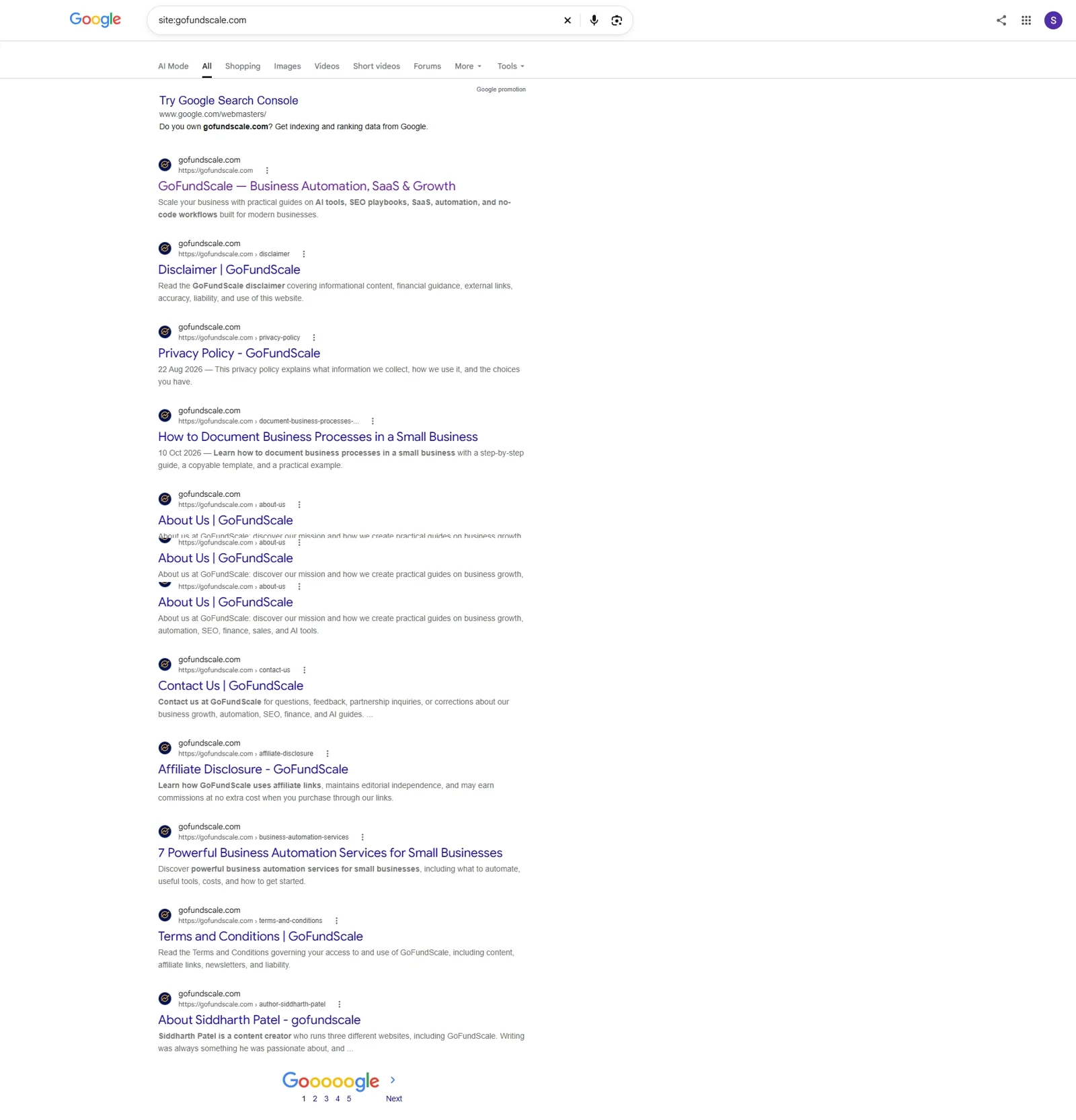
Start with a rough search check. In Google, search for site:yourdomain.com, replacing the example with your own domain. Then search for your business name and one or two important service terms. Look for the homepage and the key pages customers need. A site: search is only a quick spot-check; it is not a complete or perfectly current list of indexed URLs.
Next, open Google Search Console and select the correct website property. In the Page indexing report, compare the indexed and not-indexed totals and review the reasons listed below the chart. Some URLs are intentionally excluded, such as redirects, duplicate URLs, or pages marked as noindex. Other cases may need attention—for example, an important page blocked from crawling or a page Google could not find. Check individual URLs before deciding what to change.
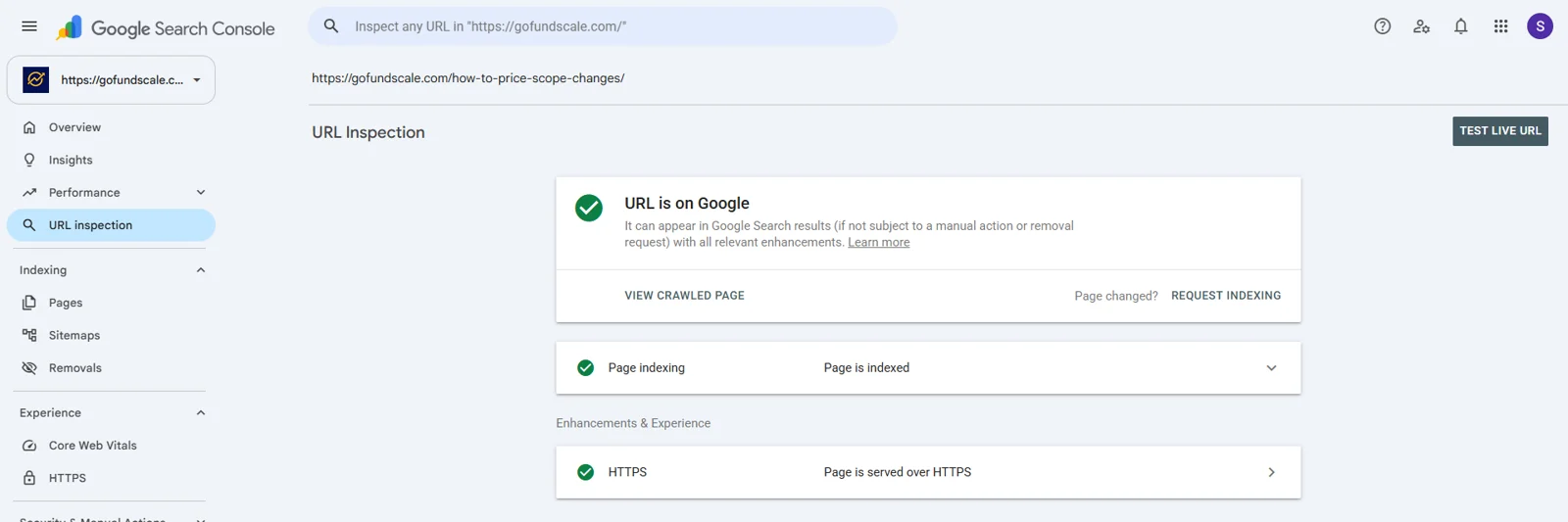
Worked example: for this article we inspected one published Gofundscale post, https://gofundscale.com/how-to-price-scope-changes/, with the URL Inspection tool in Search Console. It reports “URL is on Google” and “Page is indexed”, so no indexing action is needed for that page. Because a site: search is only a rough guide, URL Inspection is the more reliable way to confirm that a specific important page is indexed.
Minutes 10–20: review titles and main headings
Open the homepage and your most important service or product pages. Each should have a title that clearly describes what the page offers. A title such as “Home” tells a searcher very little; “Bookkeeping Services for Small Businesses in Jaipur” is more descriptive when it accurately reflects the business and location. Do not add a location if the business does not serve that area.
Check that the main heading on each page matches its purpose. Look for missing titles, repeated titles across unrelated pages, and vague descriptions. Write for people first: a title should be accurate and useful, not a list of keywords. Search engines may display a different title or snippet, so treat your edits as improvements rather than guaranteed display changes.
Minutes 20–30: check whether the content answers customer questions
Imagine a first-time visitor landing on each important page. Can they quickly understand who the business helps, what it offers, how the process works, and what to do next? Depending on the business, useful details may include service areas, product specifications, typical timelines, pricing approach, requirements, or answers to common questions.
Look for content that is thin, repetitive, outdated, or written mainly to repeat a keyword. Improve it with specific information that helps a potential customer make a decision. You do not need to make every page longer. A concise page that answers the right questions can be more useful than a long page full of filler.
Minutes 30–40: test mobile usability and page speed
Open the homepage and a key landing page on a phone, or use your browser’s responsive preview. Check whether the text is readable without zooming, menus are usable, buttons are easy to tap, and pop-ups do not block the main content. Test the main action—such as calling, requesting a quote, booking, or buying—from a mobile screen.
Then test a key URL with Google PageSpeed Insights. Review the mobile results as well as desktop results. Pay attention to the recommendations and field data when available, but do not treat one score as a complete SEO grade. Some fixes require a developer; others may involve compressing oversized images, reducing unnecessary scripts, or choosing a more efficient page layout. Prioritise changes that improve the experience for real visitors.
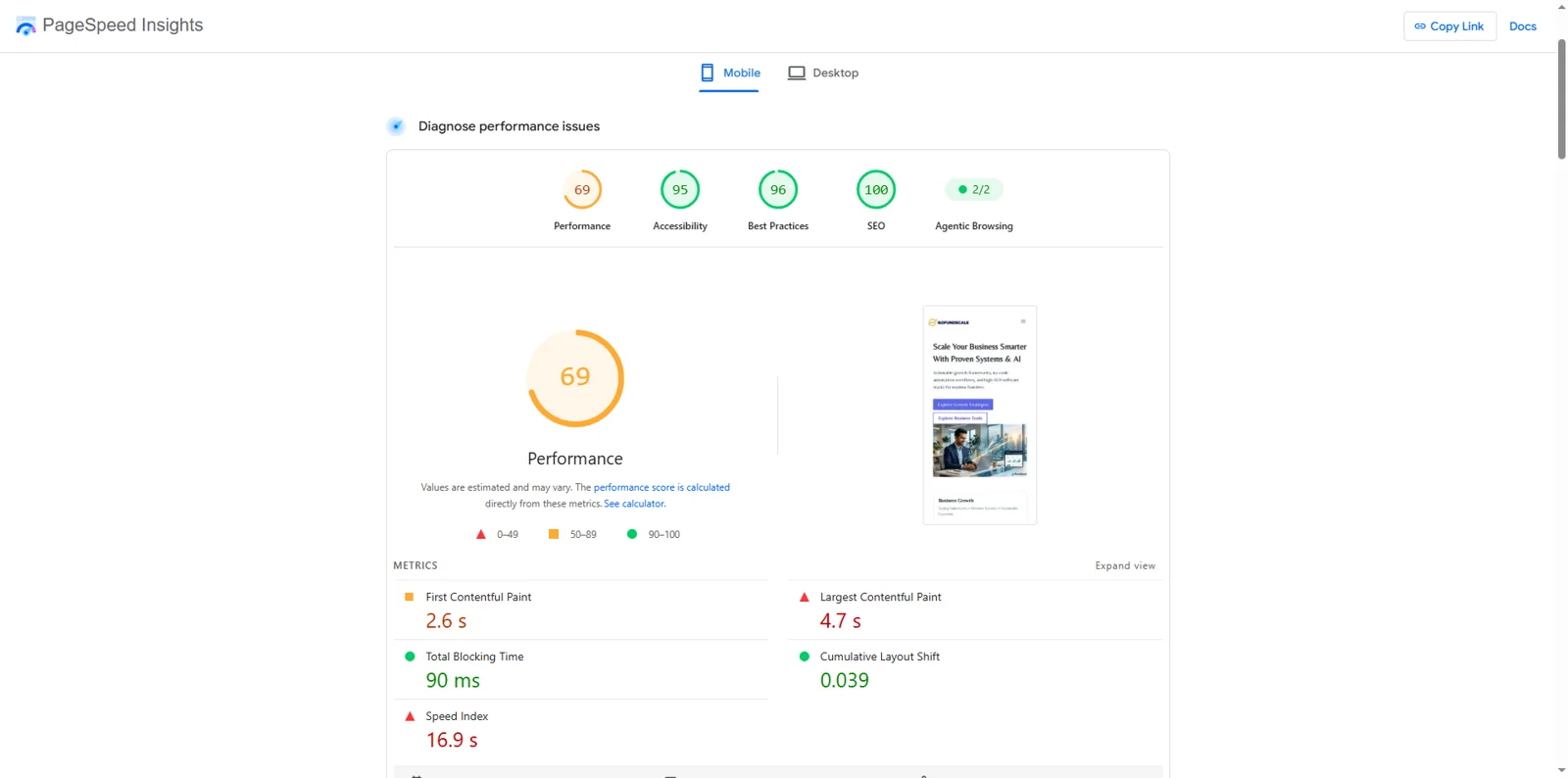
Worked example: the Gofundscale homepage scored 69 for Performance on mobile, with 95 for Accessibility, 96 for Best Practices and 100 for SEO. The figures most worth attention were Largest Contentful Paint at 4.7 seconds and Speed Index at 16.9 seconds, both flagged in red. Total Blocking Time (90 ms) and Cumulative Layout Shift (0.039) were in the green range. A sensible first step is to open the diagnostics below the metrics and see which element loads slowly, which is often a large image or script. A strong SEO score here reflects basic technical checks only; it does not predict rankings.
Minutes 40–50: review internal links and trust information
Check whether important pages can be reached through the navigation or relevant links from other pages. A service page that is difficult to find may be overlooked by visitors and search engines. Add links where they help readers move naturally to related information; avoid adding links merely to increase their number. Click a few links to catch obvious broken destinations.
Make it easy for customers to understand who operates the website and how to get in touch. Depending on the business, this may include consistent contact details, service-area information, an About page, policies, clear product or service terms, and author details for advice-based content. These details support user confidence, though no single trust element guarantees rankings.
Minutes 50–60: turn findings into a short action plan
Do not finish with a long list of observations and no next step. Sort each finding into one of three groups: fix now, schedule next, or monitor. Fix now means a valuable page is blocked, a key conversion path is broken, or a serious customer-facing issue is obvious. Schedule next covers improvements that matter but need more time. Monitor applies when the issue is understood and no immediate change is justified.
| Finding | Why it matters | First action | Priority |
|---|---|---|---|
| Important page not indexed | Potential customers may not find it through Google. | Inspect the URL and the Page indexing reason; fix the specific cause. | Fix now |
| Vague page title | Searchers may not understand the page’s purpose. | Write a clear, accurate title for that page. | Schedule next |
| Slow or awkward mobile page | Visitors may struggle to use the site. | Review PageSpeed suggestions and test the main action on a phone. | Schedule next |
| No obvious path to contact | Interested visitors may not know what to do. | Make the relevant contact or enquiry action easy to find. | Fix now |
Use your own findings to fill in the table. The rows above are prompts, not claims that these issues exist on every website.
Worked example: here is the same plan applied to Gofundscale, the author’s own website, using the checks in this article.
| Finding | Evidence | First action | Priority |
|---|---|---|---|
| Slow mobile homepage | PageSpeed Insights (mobile): Performance 69, Largest Contentful Paint 4.7 s | Open the diagnostics, find the slowest-loading element and fix the largest one first | Schedule next |
| Specific article indexed? | URL Inspection: “URL is on Google” | No action needed; recheck in the next monthly checkup | Monitor |
| Key pages visible in search | site: search lists the homepage, About, Contact and articles | Keep spot-checking monthly | Monitor |
Nothing in this example is an emergency. The one change worth scheduling is mobile speed; the rest is monitoring. That is the point of the exercise: a short, honest list you can act on.
A reusable monthly SEO checkup
- Check whether the homepage and key pages appear in search.
- Review new Page indexing issues in Search Console.
- Check titles and headings on the most important pages.
- Update content that is inaccurate, thin, or no longer helpful.
- Test the mobile experience and one or two key URLs in PageSpeed Insights.
- Click important internal links and test the main contact or purchase action.
- Choose no more than three priority actions for the next month.
The takeaway
A useful SEO checkup is not about chasing a perfect score. It is about finding the few problems most likely to affect discovery, usability, or enquiries—and fixing them in a sensible order. Repeat the checks monthly, keep notes of what changed, and use Search Console data over time rather than judging success from a single day’s result. If a technical issue is unclear, document the evidence and ask a qualified developer or SEO professional to review it before making large changes.
Related reading on SyncNeck: start with our SEO tips for beginners, then see how AI Overviews are changing Google traffic and use the AEO and GEO checklist to get cited by AI search. Want a second opinion on your checkup? Contact the SyncNeck team.
About the author
Siddharth Patel is a content creator who runs Gofundscale, which publishes practical guides on business growth, automation, SEO, finance and AI tools.