
Guest post by Steve Ojo. Edited by the SyncNeck team.
To test a lead form properly, send one marked test enquiry and follow it all the way: from the form on your phone, to the inbox your team actually uses, to the first reply and the booked call. Most broken enquiry journeys can be found and fixed in about half an hour.
A successful submission is only the beginning
A customer has a question, finds your website, and fills in the form. The page says “Thanks.” It feels as though the job is done. But the message may be sitting in the wrong inbox, missing a phone number, or waiting for a reply nobody knows they own. From the customer’s side, all three failures look the same: silence.
You can find most of these gaps with one test enquiry and about half an hour of attention. Follow the enquiry as a customer, then as the person responsible for answering it. The point is to see whether a real person can get from the form to a useful first reply and, when relevant, a booked conversation. You do not need to replace your tools to run this test.
1. Start with one test enquiry
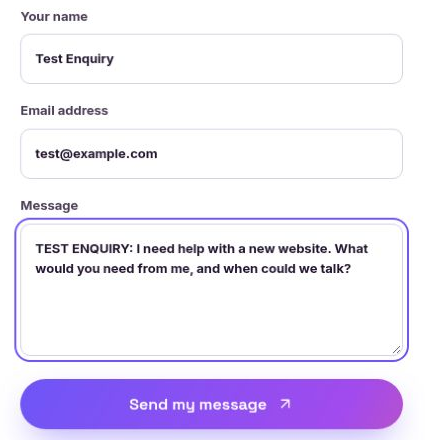
Choose a name and email address you control, and put TEST ENQUIRY at the start of your message. Use a question a prospective customer might actually ask: “I need help with a new website. What would you need from me, and when could we talk?” Note the time you submit it. Tell the team that a test is coming so nobody mistakes it for a sale.
First use your phone. Try the form without zooming in or turning the screen sideways. Can you understand the labels? Is it obvious which fields are required? If you enter an invalid email address, does the page tell you what to fix without erasing everything you typed? If the form asks for a phone number, can someone outside your country enter theirs? Submit once, then check what appears on the screen.
A confirmation such as “We’ll be in touch” may be true but is not very helpful. The visitor should know that the message was received, what happens next, and roughly when to expect a reply. Only promise a timeframe your team can meet. If a customer is expected to book a call immediately, say so and show the next step. Then repeat the test on a desktop. A form can behave differently at a wider screen size or in another browser.
Save a full-size screenshot of the form after filling it out and another of the confirmation. Use only your own test details. If you are documenting an existing customer journey, remove names, email addresses and message content before sharing it.
2. Find the enquiry where the team works
Now switch roles. Open the inbox, lead list or customer record your team actually uses, rather than the place you assume submissions go. Search for TEST ENQUIRY and compare the record with what you entered. Is the email address complete? Is the question intact? Can you tell when it arrived and where it came from? If the enquiry created more than one notification, is it clear which record should be answered?
Check the notification path as well. Who received an alert? Did it land in the primary inbox, a shared inbox, or spam? If the owner is away, can another person see the enquiry and respond? A submission stored somewhere in a system is not the same as an enquiry assigned to someone. Put a real name or role against the first reply, and agree on who covers it when that person is unavailable.
One common weak spot is forwarding. A notification goes to an old address; the record exists, but nobody sees it. Another is an attractive dashboard that nobody opens during a busy day. Test the path people follow in practice. If you cannot find the message in a minute, a rushed team member may not find it either.
Take a screenshot of the test record or notification at its original size. Show the test marker and the fields that matter, while hiding any unrelated customer information in the surrounding inbox.
3. Read the first response as the customer
Return to the email address you used in the form. Did an acknowledgement arrive? Is the sender recognizable? Can you reply to it, or does the reply disappear into an address nobody reads? Read the message aloud. It should confirm receipt, set a realistic expectation and tell the customer what to do if their request is urgent. It should not pretend that an automatic response is a personal answer.
For example: “Thanks, we received your question about a new website. Our team will review it and reply by the next business day. If there is a deadline we should know about, reply to this email.” That gives the customer a clear expectation and a way to add context. Change the wording and timeframe to match the way your business operates. If you cannot reliably meet a stated time, remove the promise.
Next, have the person who owns enquiries send a human reply to the test. Can they reply directly from the record or inbox? Does the reply go to the right address? Does it mention the customer’s question, ask for the next useful detail, and make the next step clear? A quick “Let’s talk” with no link or proposed time leaves the customer to do the work.
Run the same test outside your normal hours. You may learn that your daytime notification works but evening submissions wait unseen until Monday. There is no requirement to answer at night. The important thing is that your confirmation says what will happen and the team knows when the queue will be checked. Also check that an automatic acknowledgement does not accidentally mark the enquiry as handled before a person responds.
4. Follow the path to a booking
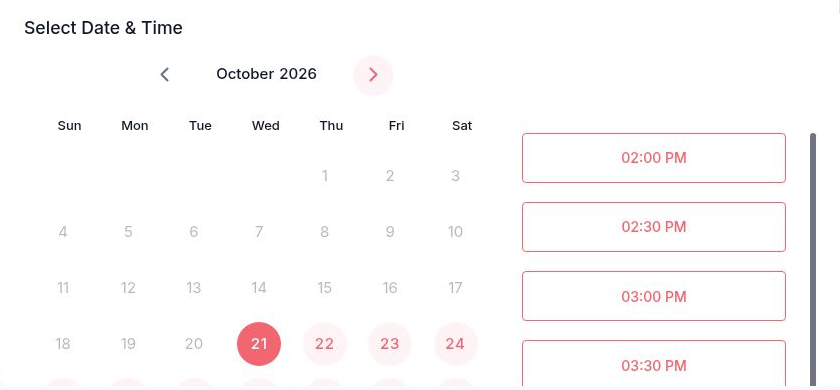
If a call or appointment is the next step, click the booking link in your reply as the customer would. Use a phone again. Can you see available times in the correct timezone? Is the length and purpose of the meeting clear? Are there sensible choices, or does the calendar show no availability for weeks? If a link is broken or asks for information the customer has already provided, fix that friction before adding more reminders.
Make one test booking. Check the confirmation page and both inboxes: did the customer receive the date, time, timezone and joining details? Did the right person on the team get the appointment? If the business uses a reminder, verify that it points to the same meeting. Try the reschedule or cancellation path, too. A customer who cannot change plans easily may simply disappear.
Keep the booking tied to the original enquiry so the person taking the call sees the question that prompted it. If that connection does not happen automatically, make a small manual handoff part of the process. The customer should not have to repeat their whole story just because they moved from a form to a calendar. Cancel the test slot afterward so it does not block a real customer.
5. Fix one gap and run the test again
Write down the first point where the journey broke. Keep the record plain: what you expected, what happened, who will fix it, and whether a second test passed. For example, “The message arrived, but notifications went to a former employee. Update the recipient and submit a new test enquiry.” A change is complete only when the new enquiry reaches the person who will answer it.
Fix the most consequential gap first. A missing notification matters more than a small wording change on the confirmation page. Then repeat the path from the form, because a correction in one place can affect another. If you change the reply address, verify an actual reply reaches the team. If you change the booking link, book and cancel another test slot. Save the final screenshots from the retest rather than relying on screenshots taken before the fix.
Make this a routine check after a site redesign, a new form, a team change, or an inbox migration. It is also worth repeating periodically even when nobody has reported a problem. Customers cannot report an enquiry you never received.
The 15-minute retest checklist
Use this short pass after a change. Mark each item only when you have seen it happen in a fresh test:
- A mobile visitor can complete the form and sees a clear confirmation.
- A desktop visitor can complete the same form.
- The full message and contact details appear in the working inbox or record.
- A named person receives the notification and an absence cover is clear.
- The acknowledgement reaches the test address and accepts a reply.
- Its response expectation matches actual working hours.
- A human reply reaches the right person and answers the question.
- The booking link opens, shows usable times and respects the timezone.
- Both sides receive the booking details and the test slot can be cancelled.
The result you want is modest and concrete: one customer enquiry enters the form, reaches the right person, gets a useful first reply, and can move to a booking without confusion. Once that works, your team can trust the journey the next real visitor takes.
About the author

Steve Ojo designs websites, lead funnels and follow-up systems for small businesses. Based in Nigeria, he works remotely with clients internationally, including businesses in the United States. See his work at steveojo.com.