
Guest post by Ranjan Kumar, reviewed by Aman Karn.
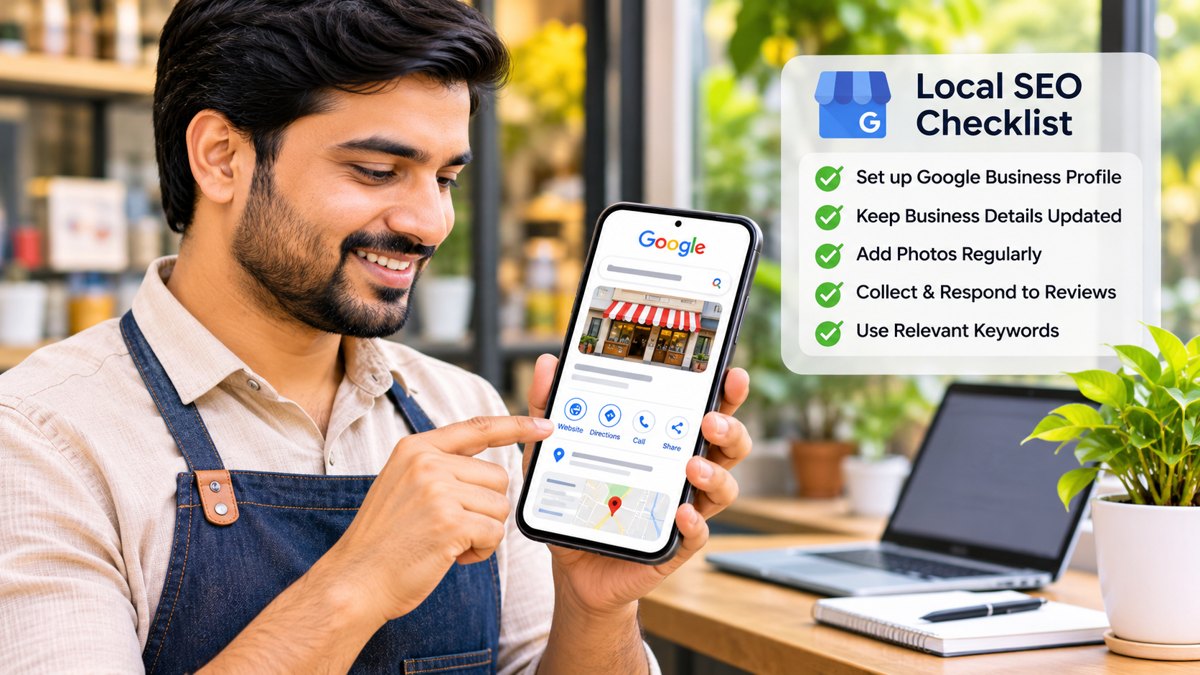
Local search helps small businesses connect with people looking for nearby products or services. A dental clinic in Delhi, a restaurant in Jaipur, a clothing shop in Lucknow, or a repair service in Pune may all be discovered through an online search before a customer decides where to visit or whom to contact.
Creating a Google Business Profile or adding a city name to a website does not guarantee visibility. Local SEO works best when business information is accurate, the website answers customer questions, reviews are genuine, and results are monitored regularly.
This checklist explains how Indian small businesses can strengthen their local search presence without expensive tools or questionable SEO tactics.
1. Set Up and Optimize Your Google Business Profile
A Google Business Profile helps eligible businesses manage how they appear on Google Search and Maps. It can make important details easier for potential customers to find.
First, check eligibility. Generally, a business must make in-person contact with customers during its stated hours. Online-only businesses and lead-generation companies are not eligible under Google’s guidelines.
Once eligibility is confirmed, review these details:
- **Business name:** Use the real-world business name. Do not add extra keywords or locations.
- **Primary category:** Choose the category that best describes the main business activity.
- **Address or service area:** Provide accurate information based on how customers are served.
- **Phone and website:** Use current contact details and the official website.
- **Business hours:** Keep regular hours accurate and update holiday or temporary changes.
- **Services and attributes:** Add relevant information that helps customers understand the offer.
- **Photos:** Where appropriate, upload genuine photos of the premises, products, team, or completed work.
What if verification fails?
Check that the business information is accurate and that the person completing verification is authorized to represent the business. Follow the verification method Google provides and submit genuine evidence when requested.
Do not create duplicate profiles or repeatedly change business details to try to bypass verification. If verification remains unresolved or a profile is suspended, consult Google’s official guidance and use the relevant support or appeal process.
Practical tip: Keep a record of the business name, address, phone number, website, and account ownership details. This helps when several people manage the profile.
2. Keep Business Information Consistent Across the Web
Customers may find a business through Google, a directory, social media, or a recommendation. Conflicting contact details can create doubt or send people to the wrong place.
Check the business information on your website and important profiles. In India, platforms such as Justdial, Sulekha, and IndiaMART may be useful when they are relevant to your industry and customers.
Review the following on each platform:
- Official business name
- Current phone number
- Correct address, where applicable
- Website address
- Business category
- Opening hours, where supported
For example, a furniture shop in Jaipur may move to a new location while an old directory listing still shows the previous address. A customer using that listing could travel to the wrong place. The business should update the listing or request a correction.
Not every business needs to be listed everywhere. Prioritize legitimate platforms that customers actually use. Avoid submitting details to large numbers of low-quality directories solely to obtain backlinks.
Practical tip: Maintain a spreadsheet of important platforms, listing URLs, the person responsible, and the last review date.
3. Make Your Website Useful for Local Customers
Your website should answer the questions a potential customer may have before making contact.
A dental clinic in Delhi might explain treatments, appointment arrangements, opening hours, and location. A restaurant may need an accessible menu, accurate hours, directions, and booking information.
Page titles and headings
Write clear titles that describe the service and, where useful, the location. “Dental Clinic in Rohini, Delhi | Clinic Name” is more informative than “Welcome to Our Website.”
Use location terms naturally. Repeating the same city or neighbourhood name too often makes content harder to read.
Contact and location information
Make phone numbers, addresses, opening hours, and directions easy to find. If the business visits customers rather than serving them at a public office, explain the actual service area.
Mobile usability
Many people search on mobile devices. Check that text is readable, buttons are easy to tap, pages load reliably, and contact options work correctly.
Relevant service pages
Create dedicated pages when they provide genuinely useful information about distinct services or locations. Each page should answer customer questions, not repeat nearly identical text with different city names.
For example, a business serving Delhi and Noida should explain its actual availability and arrangements in each area rather than publish thin, repetitive location pages.
Practical tip: Ask someone unfamiliar with the business to find a main service, phone number, address, and enquiry form. This can reveal problems that staff may overlook.
4. Encourage Genuine Customer Reviews
Reviews help potential customers understand other people’s experiences. They can also reveal areas where a business can improve its products, communication, service, or support.
Create a simple process for requesting honest feedback from genuine customers. For example, send a polite follow-up after a purchase, appointment, or completed service.
Keep these principles in mind:
- Ask for honest feedback without pressuring customers to leave positive reviews.
- Do not buy fake reviews or ask people to describe experiences they did not have.
- Do not offer discounts, gifts, or other incentives in exchange for reviews.
- Respond professionally to both positive and negative feedback.
- Never disclose private customer information in a public reply.
Consider India’s language diversity
Customers may prefer to write reviews in Hindi, Tamil, Bengali, Marathi, Telugu, or another language. Do not require everyone to write in English. A genuine regional-language review can help other people who speak that language understand the customer’s experience.
When replying, use a language your team can handle accurately. If translation assistance is used, check the meaning before publishing.
For negative reviews, acknowledge the concern and offer an appropriate way to resolve it privately. Avoid arguments or sharing sensitive details in public.
Practical tip: Review new feedback regularly and use recurring complaints to improve the customer experience, rather than treating reviews only as an SEO task.
5. Understand “Near Me” Searches
People may search for “salon near me,” “best electrician nearby,” or “restaurant near me” when they need a nearby solution. There is no keyword trick that guarantees visibility. Google’s local results are influenced by relevance, distance, and prominence.
Focus on accurate information and a useful customer experience.
For example, a repair service operating in specific parts of Mumbai should explain its real service areas, types of repairs, opening hours, and contact process. It should not claim to serve every neighbourhood if it cannot realistically do so.
Do not create multiple profiles for one business at different locations unless each location independently meets Google’s requirements. Similarly, avoid pages for neighbourhoods where the business has no meaningful presence or ability to serve customers.
6. Monitor Results with Google Search Console
Google Search Console helps website owners understand how their websites perform in Google Search and identify certain technical issues.
Start with these checks:
Search performance: Review the queries people use to find the website, the pages receiving impressions, and changes in clicks over time.
Indexing: Check whether important service and location pages are eligible to appear in Google Search. Investigate unexpected indexing problems.
Technical issues: Review relevant reports and investigate problems that may affect how visitors access or use the website.
Search Console does not show every local search interaction. It does not replace checking your Business Profile, customer enquiries, or actual business outcomes.
Compare results over reasonable periods instead of drawing conclusions from a few days of data. Seasonal demand, competition, website changes, and customer behaviour can all affect performance.
Example: Reading a 28-day Google Search Console report
The following anonymized example shows a 28-day Search performance report for 3–30 October 2026. It records 18 clicks and 559 impressions, with an average click-through rate (CTR) of 3.2% and an average position of 26.2.
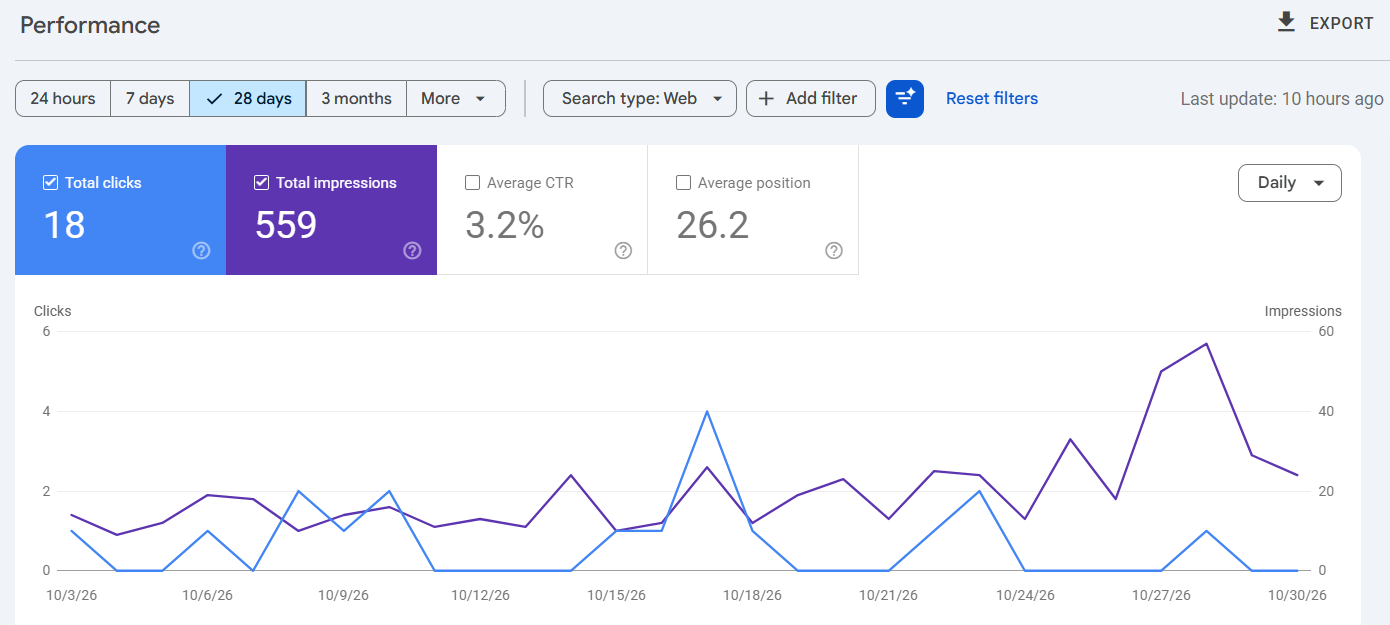
This is a snapshot of one reporting period, not a guarantee of future results. An average position of 26.2 means the site usually appeared around the third page of results, which is why impressions are far higher than clicks. Average position also varies by query, page, device and location. Start with the queries and pages that already earn impressions: open the Queries and Pages tabs, find terms close to the first page, and improve those pages before writing new ones. For a step-by-step routine, see our 60-minute SEO checkup.
7. Publish Helpful, Locally Relevant Content
Useful content answers questions customers have before buying or contacting a service provider.
A local accountant could publish a guide to preparing documents for a consultation. A restaurant might explain menu options, accessibility, or booking arrangements. A home repair company could explain how to recognize a common maintenance issue and when professional help may be needed.
Before publishing, ask:
- Does the content answer a real customer question?
- Is the information accurate and current?
- Does it include useful examples or practical steps?
- Is it written for people rather than search engines?
- Does it avoid unsupported claims and unnecessary keyword repetition?
AI tools can help with research, structure, and editing, but the final article should be checked for accuracy, originality, and usefulness. Add genuine expertise and practical detail instead of publishing large quantities of generic content.
8. A Simple Monthly Local SEO Checklist
Small businesses do not need a paid tool for every SEO task. A basic monthly review can help keep information accurate and reveal issues.
Business Profile
- Confirm business information and hours are accurate.
- Update special closures or temporary changes.
- Check for verification or profile issues.
- Review and respond to customer feedback.
Website
- Test important contact links and enquiry forms.
- Check key service pages on a mobile device.
- Update outdated prices, services, and opening hours.
- Investigate important indexing or technical issues.
Directories
- Review listings on relevant platforms.
- Correct outdated phone numbers or addresses.
- Report duplicate or inaccurate listings where possible.
Content
- Update pages containing outdated information.
- Publish useful answers to customer questions.
- Check important content for accuracy and clarity.
Performance
- Review Search Console trends.
- Track enquiries, calls, bookings, or other meaningful outcomes.
- Record completed changes and tasks still requiring attention.
Conclusion
Local SEO is an ongoing process of helping customers find accurate, relevant information about a business. For Indian small businesses, strong starting points include an eligible and well-maintained Google Business Profile, consistent business information, a useful mobile-friendly website, genuine customer reviews, and helpful local content.
Start by correcting obvious errors and providing the information customers need. Monitor results regularly and improve the process over time. Avoid fake reviews, misleading business details, repetitive location pages, and low-quality link-building schemes.
A consistent, customer-focused approach can help a business build trust and improve its chances of being discovered by people looking for relevant products or services nearby.
Related reading on SyncNeck: a 60-minute SEO checkup for a small-business website and how to test a lead form all the way to the first reply. Need help with local SEO? Contact the SyncNeck team.
AI assistance: AI tools were used to help with outlining and drafting. Ranjan Kumar reviewed the final content for accuracy, clarity and practical relevance.
About the author

Ranjan Kumar is a content writer at Ewebsoft, a digital marketing and web development agency based in Delhi, India. He writes about SEO, local search visibility and digital marketing, focusing on practical insights that help small businesses strengthen their online presence.