The best way to choose an AI writing tool for your blog is to give every tool the same brief and score the drafts on six things: accuracy, originality, structure, search basics, voice and editing time. A short test like this takes about an hour and tells you more than any “best AI writer” list, because it is based on your topics and your standards.
This post gives you the exact brief to copy, a simple scorecard, the warning signs to watch for, and what Google says about publishing AI-assisted content. It works with any tool, whether you use ChatGPT, Gemini, Claude, Copilot or a paid writing app.
Last checked: 4 October 2026, against Google Search Central’s guidance on generative AI content.
Key takeaways
- Test tools with one identical brief, so you compare the tools, not your prompts.
- Score accuracy first. A fluent draft with one invented statistic can cost you more trust than it saves in time.
- Google allows AI-assisted content, but says to fact-check everything and warns that mass-produced pages without added value can count as spam.
- The winner is the tool whose draft needs the least editing to reach your standard, not the one that writes the most words.
Why test AI writing tools yourself?
Because results depend on your topic, your audience and how you edit. A tool that writes good travel posts may struggle with medical or financial topics. A tool that sounds natural in American English may miss Indian examples, rupee prices or local context. Reviews written by others rarely use your kind of content, so a one-hour test of your own is the most reliable guide.
Step 1: Write one brief and use it everywhere
Pick a topic you know well, so you can spot mistakes quickly. Then paste the same brief into each tool, in a fresh chat, without extra hints. Here is the brief we recommend. Change only the topic line.
Write a blog post for small business owners in India.
Topic: How to get more Google reviews for a local shop.
Length: about 900 words.
Audience: beginners, no technical knowledge.
Structure: a direct 2-sentence answer at the top, then
question-style H2 headings, one numbered list, and
3 FAQs at the end.
Include: at least 2 facts with a named, linkable source.
Do not invent statistics, quotes or sources.
Tone: friendly, plain English, short sentences.
The brief deliberately asks for sources and forbids invented facts. How each tool handles that instruction is one of the most useful things you will learn.
Step 2: Score every draft on six checks
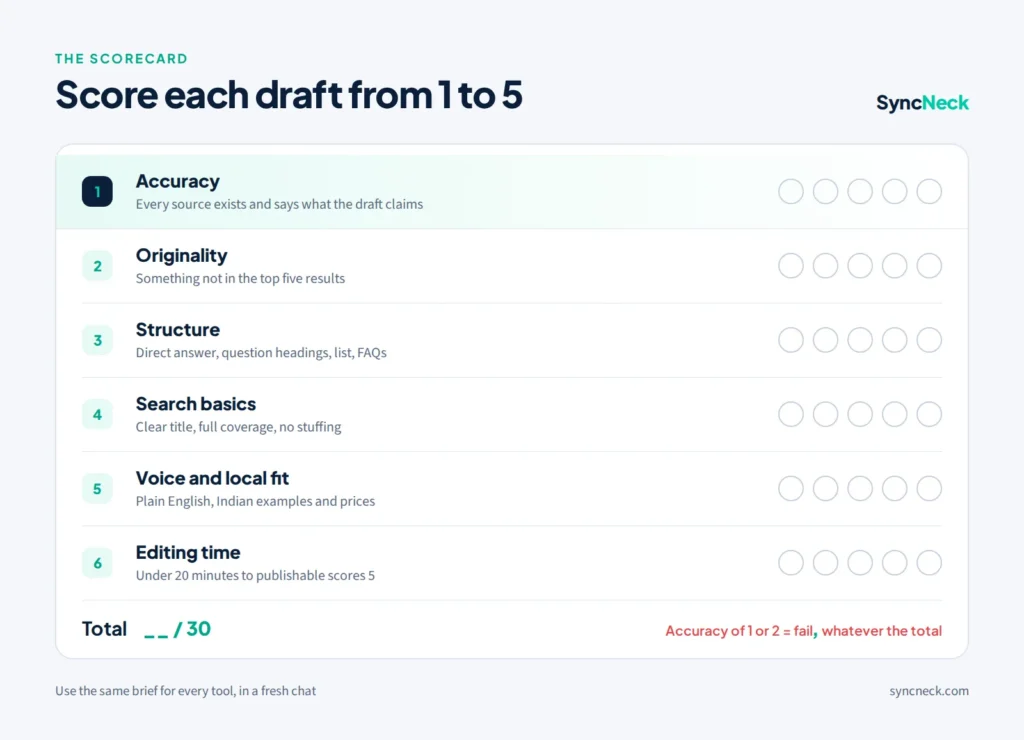
Give each draft a score from 1 to 5 on the six checks below, then add them up out of 30. Do the accuracy check first and on its own, because it is the one that can do real damage.
| Check | What to look for | Score 1 to 5 |
|---|---|---|
| 1. Accuracy | Click every source. Does it exist, and does it say what the draft claims? | |
| 2. Originality | Any useful example, angle or detail you would not find in the top five Google results? | |
| 3. Structure | Direct answer at the top, question headings, a list and FAQs as asked? | |
| 4. Search basics | Clear title, topic covered fully, natural use of the main phrase, no keyword stuffing? | |
| 5. Voice and local fit | Plain English, short sentences, Indian examples and prices where they help? | |
| 6. Editing time | How long did it take you to make it publishable? Under 20 minutes scores 5. |
If a draft scores 1 or 2 on accuracy, treat it as a fail, whatever its total. A beautifully written post with a fake statistic is worse than a plain post with true ones.
Step 3: Watch for these six warning signs
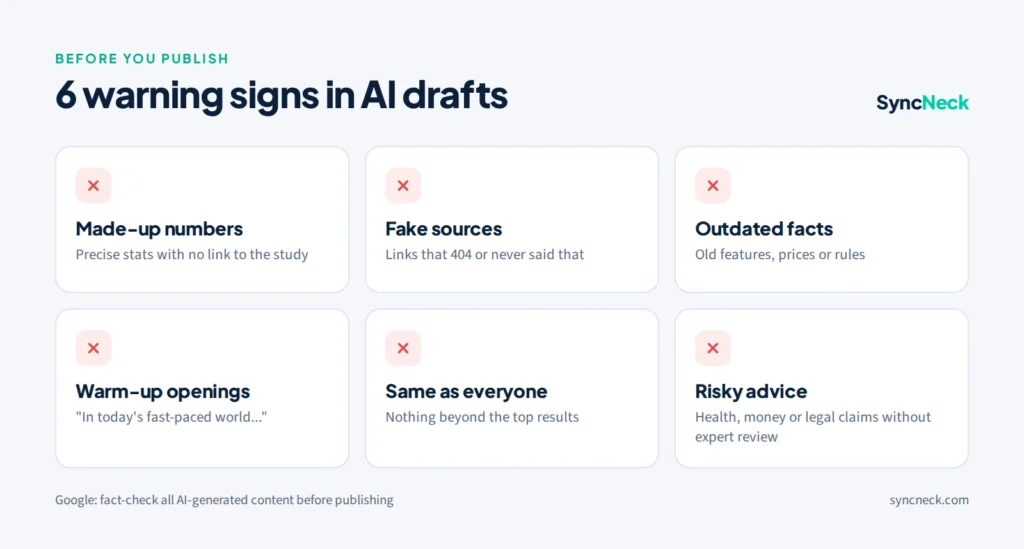
- Made-up numbers. Very precise figures like “73.4% of shoppers” with no link, or a link to a homepage instead of the study.
- Sources that do not exist. Links that return a 404 error, or real websites that never published the quoted article.
- Outdated facts. Old features, old prices or rules that changed. Check anything time-sensitive against the official source.
- Warm-up openings. “In today’s fast-paced digital world…” means the answer is buried, which hurts you in AI Overviews and answer boxes.
- Same post as everyone else. If every point appears in the top results already, the draft adds nothing that Google or an AI tool would want to cite.
- Confident advice on risky topics. Health, money and legal advice needs expert review. Google treats these as “Your Money or Your Life” topics, explained in our guide to YMYL.
What does Google say about AI-written content?
Google does not ban AI-assisted content, but it judges the result like any other page: is it accurate, original and helpful? Its guidance on generative AI content makes three points every blogger should know:
- Fact-check everything. Google says AI output may contain inaccuracies and that it is “critical to manually factcheck and review all AI-generated content” before publishing, including titles, meta descriptions, structured data and image alt text.
- Do not publish at scale without adding value. Generating many pages “without adding value for users may violate Google’s spam policy on scaled content abuse.” Our post on the September 2026 spam update shows why this matters now.
- Consider telling readers how content was made. Google says sharing how a piece was created “can help give your readers more context.”
Step 4: Pick a winner and set your workflow
Add up the scores, but break ties on accuracy and editing time. Then decide what the tool is allowed to do. A workflow that works for most small blogs:
- You choose the topic from real search questions and customer questions.
- AI drafts the outline and a first version of each section.
- You add what only you have: your examples, photos, prices, results and opinions.
- You check every fact against its original source and fix or remove anything you cannot verify.
- You edit for voice and make sure the first two sentences answer the question directly.
Step 3 is what makes a post worth ranking and worth citing by AI tools. Our AEO and GEO checklist explains why original details matter so much in AI search, and our content marketing guide covers how to plan topics that bring customers.
Repeat the test every few months
AI tools change quickly, and a tool that came last in spring may lead by autumn. Save your brief and scorecard, and rerun the same test every three to six months, or whenever a major new model is released. Because the brief stays the same, you can compare results fairly over time.
Quick answers
Which AI writing tool is best for blogs?
It depends on your topics and standards. Give each tool the same brief and pick the one whose draft is accurate and needs the least editing to reach your quality.
Does Google penalise AI-written content?
Not for being AI-written. Google judges content on quality. It says to fact-check AI content and warns that mass-producing pages without added value can break its scaled content abuse spam policy.
Should I tell readers I used AI?
Google says sharing how content was created can give readers helpful context. A short note, such as drafted with AI and checked by our editor, builds trust.
How often should I retest AI writing tools?
Every three to six months, or when a major new model launches. Use the same brief each time so you can compare fairly.
Want more on using AI well in marketing? Visit our AI in digital marketing page or join the free Monday newsletter.