AEO (answer engine optimization) gets your content chosen as the direct answer in Google’s AI Overviews, featured snippets and voice assistants. GEO (generative engine optimization) gets your website mentioned and cited by AI tools like ChatGPT, Gemini and Perplexity. Both reward the same thing: pages that are easy to find, answer clearly and are worth quoting.
This post turns both ideas into one practical checklist you can apply to any page on your site this week. Every step is something we use on SyncNeck itself, and every claim links to its source.
Last checked: 4 October 2026, against Google Search Central, OpenAI and Perplexity documentation.
Key takeaways
- Google says there are no special tricks for AI Overviews or AI Mode. A page must be indexed and allowed to show a snippet.
- AI chat tools can only cite pages their search crawlers are allowed to read, so check your robots.txt.
- Answer the question in 40 to 60 words right under a question heading, then add detail.
- Facts, numbers and named sources make a page more quotable. Research on GEO found this can raise visibility in AI answers by up to 40%.
- Search Console now shows how often your pages appear in AI Overviews and AI Mode, for websites worldwide.
What is the difference between AEO and GEO?
AEO aims to make one passage of your page the answer to one question, inside Google’s results or a voice reply. GEO aims to make your whole brand and site a source that AI chat tools trust, mention and link to when they write their own answers. AEO is about the answer box. GEO is about the conversation.
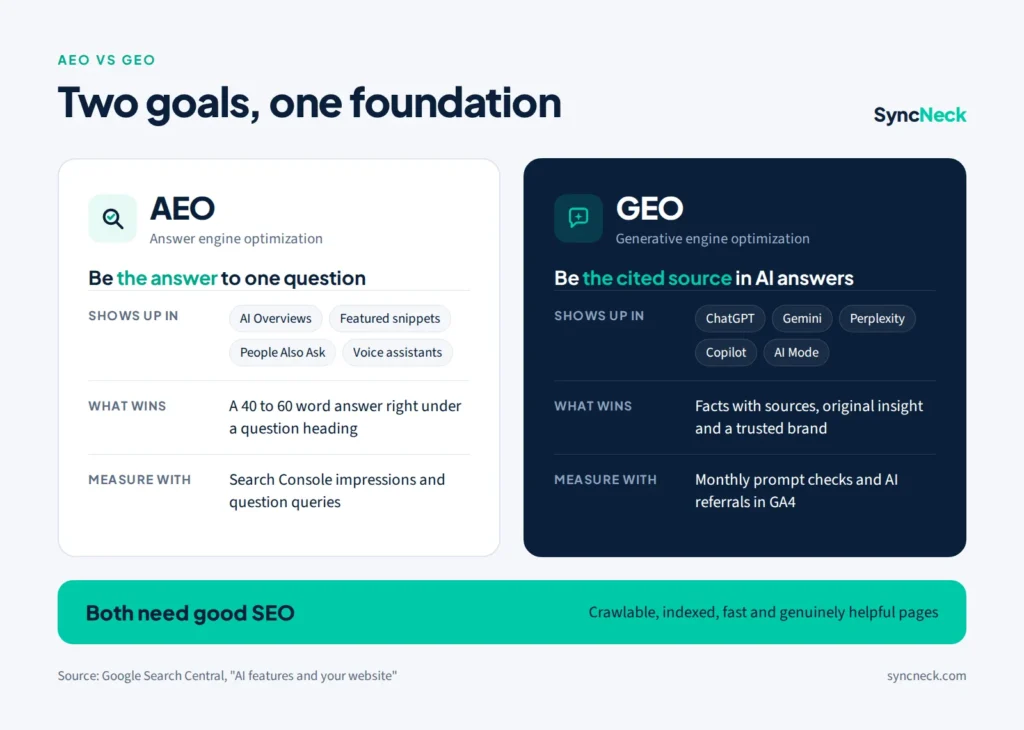
| AEO | GEO | |
|---|---|---|
| Goal | Be the direct answer to a question | Be cited or mentioned in an AI-written answer |
| Where you appear | AI Overviews, featured snippets, People Also Ask, voice assistants | ChatGPT, Gemini, Perplexity, Copilot, Google AI Mode |
| What wins | A short, clear answer under the right heading | Trusted facts, sources and a recognisable brand |
| How to measure | Search Console impressions and question queries | Prompt checks in AI tools and referral visits in GA4 |
If you are new to either term, start with our beginner guides to answer engine optimization and generative engine optimization. This checklist builds on both.
What Google actually says about AI search
A lot of AEO and GEO advice online is guesswork, so it helps to start with what Google has put in writing. Its guide to AI features says there are “no additional requirements to appear in AI Overviews or AI Mode, nor other special optimizations necessary.”
To be shown as a supporting link, a page must be indexed and eligible to appear in Google Search with a snippet. Google also says you do not need to create new machine-readable files, AI text files or special markup. In other words, AEO and GEO are not a separate trick. They are good SEO, written so that machines can lift out the answer and trust it.
The 12-point AEO and GEO checklist
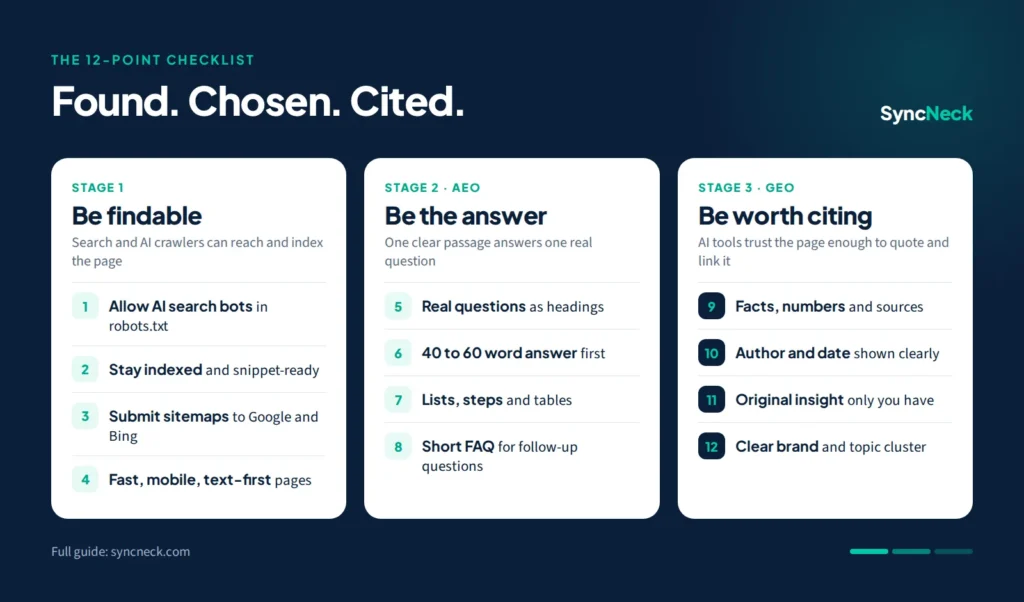
The checklist has three stages. A page has to be found before it can be the answer, and it has to be the answer before AI tools will cite it.
Stage 1: Be findable
1. Let the right crawlers in. Google AI features use Googlebot. ChatGPT search uses OAI-SearchBot, and OpenAI says sites that block it will not be shown in ChatGPT search answers. Perplexity uses PerplexityBot. Open yoursite.com/robots.txt and make sure none of these are blocked. A safe starting point looks like this:
User-agent: *
Disallow:

User-agent: OAI-SearchBot
Allow: /

User-agent: PerplexityBot
Allow: /

Sitemap: https://yoursite.com/sitemap_index.xml
Blocking GPTBot or Google-Extended only stops your content being used to train AI models. It does not remove you from AI search answers, so you can block training and still be cited.
2. Keep pages indexed and snippet-ready. Check important pages with the URL Inspection tool in Google Search Console. Avoid nosnippet and very short max-snippet settings on pages you want quoted, because they also limit AI features.
3. Submit your sitemap to Google and Bing. Microsoft Copilot draws on the Bing index, and some other AI tools use Bing results too. Setting up Bing Webmaster Tools takes ten minutes and widens your reach.
4. Make the page fast and readable on a phone. Put your answers in plain HTML text, not inside images, PDFs or scripts that load late. Fast pages that pass Core Web Vitals are easier for crawlers to fetch and for people to read.
Stage 2: Be the answer (AEO)
5. Use real questions as headings. Find them in Google’s autocomplete, the People Also Ask box and your Search Console queries. Our guide to keyword ideas from Google shows where to look, and question keywords explains which ones still bring clicks.
6. Answer in 40 to 60 words, right under the heading. Start with the answer itself, not a warm-up sentence. Name the thing you are defining in the first few words, so the passage still makes sense when it is lifted out on its own.
7. Use lists, steps and tables. Answer engines love structure they can copy cleanly: numbered steps for a process, a table for a comparison, a short list for options. Keep one idea per list item.
8. Add a short FAQ section. Finish important pages with three to five follow-up questions and short, direct answers. These match the follow-up questions people ask AI tools. Note that Google stopped showing FAQ rich results in May 2026. FAQ schema is still valid and does no harm, but the value now comes from the visible questions and answers, not from a special result.
Stage 3: Be worth citing (GEO)
9. Add facts, numbers and sources. The original GEO research paper (presented at KDD 2024) found that optimizing content this way can boost visibility in generative engine answers by up to 40%. Adding statistics, quotations and citations to credible sources were among the methods it tested. Replace “many people” with a number, and link to where the number comes from.
10. Show who wrote it and when. Add an author name, a short bio and a visible “last updated” or “last checked” date. These are the trust signals Google describes as E-E-A-T, and AI tools prefer recent, clearly owned sources for fast-changing topics.
11. Include something only you can offer. An AI summary can explain what a meta description is. It cannot copy your own test results, screenshots, prices in rupees, local examples or templates. Original information is the main reason an AI tool would cite your page instead of the hundred others saying the same thing.
12. Build a clear brand and a full topic cluster. Describe your brand the same way on your About page, social profiles and directories, so AI tools connect the dots. Then cover a topic from every angle and link the pages together. Our guides to topic clusters and topical authority show how.
Example: one paragraph, before and after
Here is the same section of a local bakery’s blog post, written two ways for the question “How long does homemade bread stay fresh?”
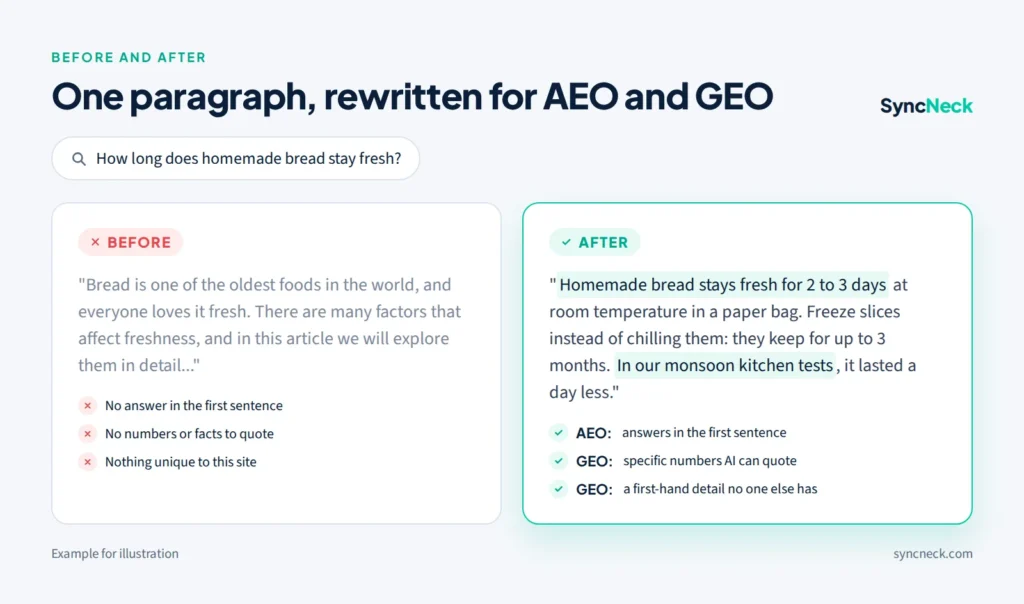
Before: “Bread is one of the oldest foods in the world, and everyone loves it fresh. There are many factors that affect freshness, and in this article we will explore them in detail so you can enjoy your bread for longer.”
After: “Homemade bread stays fresh for 2 to 3 days at room temperature in a paper bag or bread box. In the fridge it dries out faster, so freeze slices instead: they keep for up to 3 months. In our kitchen tests in Hyderabad’s humid monsoon, bread lasted about one day less.”
The “after” version answers in the first sentence (AEO), gives specific numbers (GEO), and adds a first-hand detail no other site has (GEO). It also works perfectly when read out by a voice assistant.
How to measure AEO and GEO results
Use Search Console for Google’s AI features, run monthly prompt checks for AI chat tools, and track AI referral visits in GA4. No single tool shows everything yet, so combine the three.
- Search Console generative AI reports. Google added reports showing how often your pages appear in AI Overviews, AI Mode and AI features in Discover, and rolled them out to all websites on 31 August 2026. They show impressions by page, country and date, but not clicks. Small sites may need some AI impressions before the report appears.
- Monthly prompt checks. Write down 10 questions your customers ask. Once a month, ask them in ChatGPT, Gemini and Perplexity and note whether your site is mentioned or linked. A simple spreadsheet with columns for date, question, tool, mentioned (yes/no) and linked page is enough.
- AI referrals in GA4. In GA4, open Traffic acquisition and look at the session source for chatgpt.com, perplexity.ai, gemini.google.com and copilot.microsoft.com. These visits are often small but very engaged.
Expect impressions to move before clicks. When an AI Overview appears, clicks to the top result fall by about 58%, according to an Ahrefs study we covered in how to still get traffic from Google. Being the cited source is how you win back that visibility.
Five AEO and GEO myths to ignore
- “You need an llms.txt file to show up in AI.” Google says you do not need special AI text files for its AI features. An llms.txt file does no harm, but it is not a ranking switch.
- “GEO replaces SEO.” AI tools mostly cite pages that already rank and are trusted. Weak SEO means weak GEO.
- “Stuff the page with question keywords.” Repeating a question ten times makes the answer harder to find, not easier. Ask it once, answer it once, clearly.
- “Mass AI-written pages will get cited.” Pages that repeat what everyone else says give AI tools no reason to choose them. Original facts and experience do.
- “Blocking AI training bots hides you from AI search.” Training bots and search bots are separate. You can block GPTBot and still allow OAI-SearchBot.
Your one-week action plan
- Day 1: Check robots.txt for OAI-SearchBot, PerplexityBot and Googlebot, and submit your sitemap to Bing.
- Day 2: Pick your five most visited pages in Search Console.
- Day 3: Rewrite the opening of each one so it answers the main question in 40 to 60 words.
- Day 4: Add one number with a source and one first-hand detail to each page.
- Day 5: Add a three-question FAQ, an author line and a “last checked” date.
- Day 6 and 7: Run your first 10 prompt checks and save the results as your starting point.
Quick answers
What is the difference between AEO and GEO?
AEO helps one passage of your page become the direct answer in Google's AI Overviews, featured snippets or voice assistants. GEO helps your website get mentioned and cited by AI chat tools like ChatGPT, Gemini and Perplexity. Both start with good SEO.
Do I need an llms.txt file for AI search?
No. Google says you do not need special AI text files to appear in AI Overviews or AI Mode. An llms.txt file does no harm, but clear answers, open crawler access and good SEO matter far more.
How do I know if ChatGPT or Perplexity cites my website?
Once a month, ask them the questions your customers ask and note whether your site is mentioned or linked. In GA4, also check for visits from chatgpt.com and perplexity.ai.
How long do AEO and GEO take to work?
Changes to a page Google has already indexed can show up within a few weeks. AI chat tools vary, so track your results monthly for about three months before judging.
Want the latest changes to AI search as they happen? Visit our AI in digital marketing page or join the free Monday newsletter.